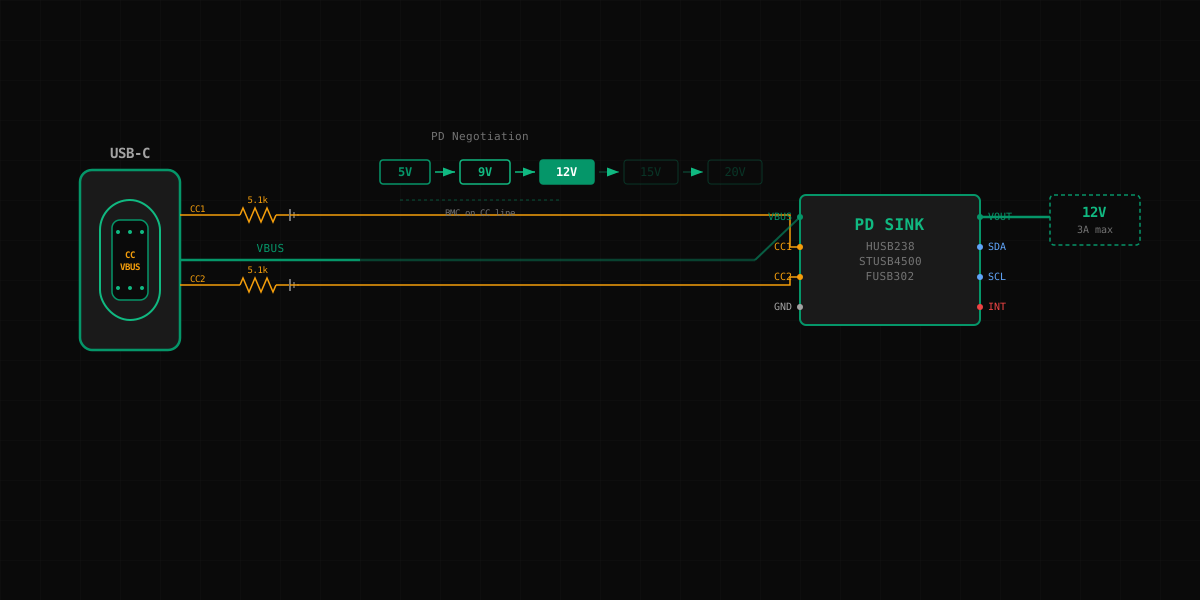
It started innocently enough. I had a small motor driver board that needed 12 V at about 2 A. The old barrel jack connector was taking up too much space on the PCB, and the mechanical engineer had already spec'd a USB-C receptacle for the enclosure. "Just use USB-C for power," he said. "Everything is USB-C now."
How hard can it be?
The naive approach
My first instinct was to treat the USB-C connector like a dumb power jack. Wire VBUS to the input of my buck converter, GND to ground, ignore everything else. I had seen teardowns of cheap USB-C fans and LED strips that seemed to do exactly this.
I wired it up, plugged it into my laptop's USB-C charger, and got 5 V.
Five volts. Not twelve. My motor driver sat there doing nothing, its under-voltage lockout blinking at me like a disappointed parent.
Here is the thing about USB-C that nobody tells you on page one: the default output of any USB-C port is 5 V at 500 mA (USB 2.0) or 900 mA (USB 3.x), and up to 1.5 A / 3 A if the source advertises more via the CC pins. You do not magically get higher voltages just because you plugged into a 65 W charger. That charger is perfectly capable of delivering 20 V at 3.25 A, but it will sit there at 5 V forever unless something on your board asks for more.
That "asking" is called USB Power Delivery negotiation, and it is where the rabbit hole begins.
The CC resistor awakening
Before we even get to PD negotiation, there is a more fundamental problem. If you leave the CC (Configuration Channel) pins floating, many USB-C sources will not even provide the default 5 V. The CC pins are how a source detects that a sink is attached. No pull-down on CC, no detection, no power.
The fix is simple: a 5.1k resistor from each CC pin to ground.
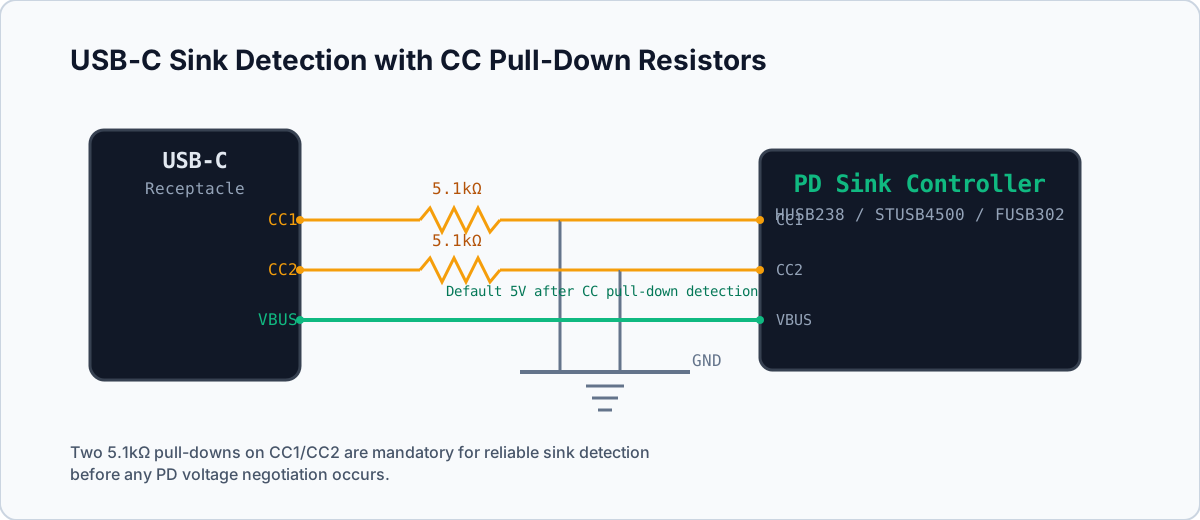
Those two resistors tell the source: "I am a sink device, give me the default USB power." The source sees the pull-down, applies its own pull-up on CC, detects the voltage divider, and enables VBUS. Without them, you are at the mercy of whatever the source does when it sees an open circuit on CC. Some chargers will provide 5 V anyway. Some will not. Good luck shipping a product that works "sometimes."
With the 5.1k resistors in place, I now had a reliable 5 V. Progress. But still not 12 V.
This is the point where I realized the USB-C specification has layers, like a particularly unfriendly onion.
Enter PD negotiation
USB Power Delivery is a protocol that runs over the CC pin. Yes, the same CC pin that is doing the pull-up/pull-down detection. Once the connection is established, the source and sink exchange structured messages using Biphase Mark Coding (BMC) at 300 kbaud on the CC line. The source advertises its capabilities ("I can do 5 V/3 A, 9 V/3 A, 12 V/2.5 A, 20 V/1.6 A"), and the sink sends a request for the voltage and current it wants.
This is not a suggestion. The source will not randomly offer you 12 V. You must implement the PD protocol, parse the source capabilities message, select a PDO (Power Data Object) that matches your needs, and send a request. The source then transitions VBUS to the requested voltage. This transition happens while your circuit is connected. Let that sink in. VBUS is going to swing from 5 V to 12 V while your downstream electronics are watching.
You cannot bit-bang BMC on a GPIO and call it a day. Well, people have done it, but not people who want to sleep at night. You need a PD PHY — a chip that handles the physical layer of the CC communication — and either hardware logic or firmware to manage the protocol state machine.
I had gone from "wire up VBUS" to "implement a communications protocol on a power pin." Time to look at actual silicon.
Three approaches to PD sink design
After reading far too many datasheets and application notes, I narrowed it down to three approaches, each sitting at a different point on the complexity-versus-flexibility spectrum.
HUSB238: Dead-simple pin-strapped PD sink
The Hynetek HUSB238 is the "just give me 12 V and leave me alone" chip. It is a standalone USB-C PD sink controller that handles everything — CC detection, PD negotiation, VBUS output control — with zero firmware. You select the desired voltage and current by strapping two GPIO pins to specific resistor dividers, or via I2C if you want runtime control.
Power up, and it negotiates the voltage you asked for. If the source cannot provide it, it falls back gracefully. That is it. No MCU needed. No firmware. The BOM for a basic 12 V PD sink is the HUSB238, two decoupling caps, and a pair of strapping resistors.
The catch? You get what you get. If you need to dynamically switch between voltage rails, or implement PD 3.1 Extended Power Range, or do anything creative with the PD protocol, the HUSB238 will politely refuse. It is a fixed-function part, and it is excellent at that fixed function.
STUSB4500: NVM-programmable PD controller
STMicroelectronics' STUSB4500 sits in the middle ground. It contains a PD PHY and protocol engine with a built-in non-volatile memory (NVM) that stores your desired PD configuration. You program the NVM once (via I2C during development), and the chip negotiates autonomously on every power-up — no MCU required in steady state.
But unlike the HUSB238, the STUSB4500 exposes the full PD state machine over I2C. Want to renegotiate at runtime? Send a command. Want to respond to source capability changes? Read the interrupt register. It handles PD 2.0/3.0 fixed PDO negotiation, so you can store up to three preferred power profiles in NVM and the chip selects the best match from whatever the source advertises.
The complexity cost is real though. The NVM programming workflow requires ST's tooling or a custom I2C sequence. The datasheet is ~40 pages. There are GPIO configuration pins for power path control, a discharge path for VBUS transitions, and a VBUS switch enable output. You will spend a day on the reference design before you start your own layout.
FUSB302 + firmware: Maximum flexibility, maximum pain
The ON Semiconductor (now onsemi) FUSB302 is a raw PD PHY. It handles the electrical interface to the CC line — BMC encoding/decoding, GoodCRC responses, voltage-level translation — but the protocol logic is entirely your problem. You connect it to an MCU over I2C, and your firmware implements the PD policy engine: parsing source capabilities, selecting PDOs, managing power role swaps, handling hard resets.
This is what the open-source PD stacks (like the TCPMv2 in the Chromium EC codebase, or the community PD Buddy firmware) are built on. If you need PD 3.1 EPR, alternate mode negotiation for DisplayPort over USB-C, or some exotic power contract, this is where you end up.
The FUSB302 gives you everything. It also gives you the responsibility of handling every edge case in a protocol that has more errata than some chips have pages in their datasheet. Hard reset during a voltage transition? Your firmware needs to handle it. Source goes away mid-negotiation? That is a state machine transition you need to implement. Want to pass USB-IF compliance testing? Budget three months.
The comparison
| HUSB238 | STUSB4500 | FUSB302 | |
|---|---|---|---|
| Vendor | Hynetek | STMicroelectronics | onsemi |
| MCU required | No | No (NVM) / Optional (I2C) | Yes |
| Firmware required | No | No (but helpful) | Yes, full PD stack |
| PD version | PD 3.0 | PD 2.0/3.0 | PD 3.1 (firmware-dependent) |
| Voltage selection | Pin-strap or I2C | NVM + I2C | Firmware-defined |
| Typical BOM | 4-5 parts | 10-15 parts | 15+ parts + MCU |
| Package | DFN-10L | QFN-24 | WLCSP-9 or MLP-14 |
| Unit cost (1k) | ~$0.40 | ~$1.20 | ~$0.80 + MCU |
| Time to working board | 1 day | 3-5 days | 2-4 weeks |
| Best for | Fixed voltage sinks | Configurable products | Custom PD applications |
The gotchas nobody warns you about
After getting all three approaches working on different projects, here is the collection of scars I have accumulated.
VBUS transition spikes. When the source transitions from 5 V to your requested voltage, there is a brief moment where VBUS can overshoot. The PD spec allows ~5% overshoot during transitions. If you asked for 20 V, your downstream circuit might see 21 V for a few milliseconds. Size your input capacitors and voltage ratings accordingly. I learned this when a 25 V-rated cap on a 20 V rail let out its magic smoke during a PD renegotiation.
Cable detection vs. orientation. USB-C cables have CC wires. But only one CC wire carries the PD communication at any time — which one depends on the cable orientation. The PD controller needs to figure out which CC pin is connected to the source's CC pull-up and use that one for BMC communication. The HUSB238 and STUSB4500 handle this transparently. With the FUSB302, your firmware needs to poll both CC pins, detect which one has the right voltage, and configure the multiplexer accordingly.
Power role vs. data role. USB-C separates power direction from data direction. You can be a power sink (receiving power) but a data host (DFP). This matters if your USB-C port also carries data. The CC resistors that make you a sink (5.1k pull-down) also make you a data device (UFP) by default. If you need to be a power sink but a data host, you need to implement role swaps. The HUSB238 does not support this at all. The STUSB4500 supports power role swap. The FUSB302 supports everything, if you write the firmware.
Dead battery mode. What happens when your product has a completely dead battery and you plug in USB-C to charge it? Your PD controller needs power to negotiate for power. Most PD sink controllers include a dead-battery mode where CC pull-downs are applied passively, so the source provides default 5 V even before the controller boots. The HUSB238 handles this automatically. The STUSB4500 has a dedicated dead-battery mode. With the FUSB302, you need an external resistor network that is bypassed once the MCU boots. Miss this, and your product becomes a brick when the battery dies.
The "negotiation takes time" problem. PD negotiation is not instant. From plug-in to negotiated voltage can take 200-500 ms. Your system needs to survive on 5 V (or nothing) during this window. If your main load has an UVLO at 10 V, it will not even try to start until negotiation completes. Design your power sequencing accordingly — a MOSFET switch on VBUS that only enables the downstream path after the PD controller signals a successful negotiation is common practice.
The decision matrix
After going through this three times on different products, my decision process is now simple:
Use the HUSB238 when you know exactly what voltage you need, it will never change, and you do not want to think about firmware. LED drivers, motor controllers, bench power adapters, any "appliance" that just needs X volts from USB-C. This was my motor driver board. I should have started here.
Use the STUSB4500 when you need some flexibility — maybe your product has a "performance mode" at 20 V and an "efficiency mode" at 12 V, or you want to store multiple PDO preferences in NVM and renegotiate at runtime over I2C. It gives you configurability without requiring a full PD firmware stack. Good for products that already have an MCU for other reasons.
Use the FUSB302 when you are building a USB-C dock, a device that needs alternate mode negotiation, anything that does power role swaps, or you are developing a platform where USB-C PD behavior is a core feature rather than a means of getting power. Accept that you are signing up for a firmware project. Use an established open-source PD stack. Do not roll your own.
Hindsight
I started this project wanting 12 V from a USB-C connector. I now have what amounts to a graduate-level understanding of the USB PD specification, opinions about BMC bit timing, and a parts drawer with three different PD controller evaluation boards.
The USB-C ecosystem is genuinely well-designed — the capability model, the negotiation protocol, the safety mechanisms. But it has a discovery curve that punishes the "how hard can it be?" attitude. If you are just starting with USB-C PD, start with the HUSB238. Get something working. Understand the negotiation by watching it happen. Then decide if you need more.
You probably do not need more. But if you do, at least you will know why.